NewsStrikey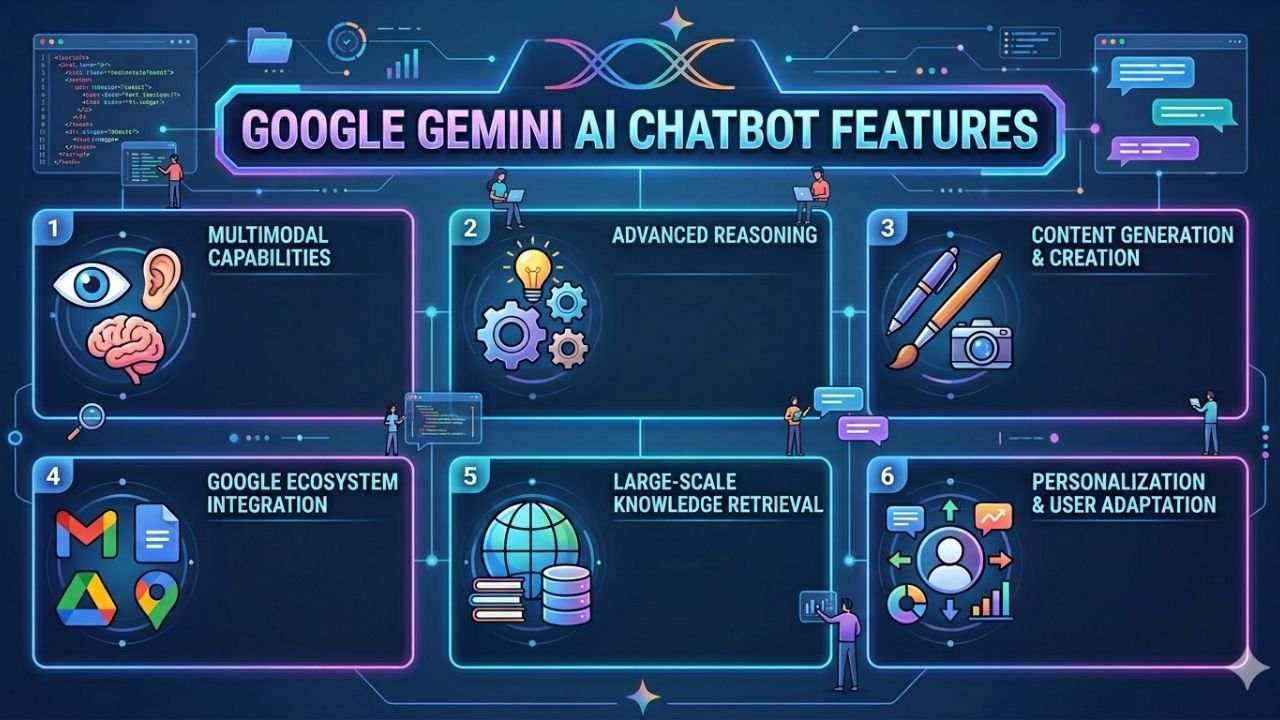
I still remember the day I switched from using Google Search for everything to trying out Google Gemini AI chatbot features for the first time. It was late 2024, and honestly, I was skeptical. I had tried Bard before — and let’s be real, it was not impressive. But Gemini? Gemini was a completely different story.
What started as a casual experiment turned into a daily habit. Over the past year and a half, I have used Gemini to write emails, plan content calendars, analyze documents, generate images, research topics, and even create short video clips. This is not a sponsored post. This is me — someone who genuinely relies on AI tools for work — telling you what I found after hundreds of hours of testing.
In this article, I am breaking down all the Google Gemini AI chatbot features that matter in 2026, who they are for, what works, what does not, and whether it is worth your time and money. Whether you are a student, a freelancer, a content creator, or a business professional, there is something here for you.
A Quick History Before We Dive In
Before we get into the features, let me give you quick context. Google originally launched Bard in February 2023, and the rollout was rocky to say the least. The chatbot gave a factually wrong answer in its very first demo, which wiped billions off Google’s stock price in a single day.
By February 2024, Google rebranded Bard as Gemini. Then things started getting serious. The Gemini 2.5 Pro release brought a massive 2 million token context window, meaning you can feed it enormous amounts of text — entire books, legal documents, huge codebases — and it handles them. By late 2025, Gemini 3 Pro launched and became the most intelligent model at that point. By May 2026, Gemini 3.5 Flash became the new default, running four times faster than previous leading models.
Today, Gemini has over 900 million monthly users and is available in more than 230 countries in over 70 languages. It is not just a chatbot anymore. It is the AI backbone of almost everything Google does — Search, Gmail, Docs, YouTube, Android, Chrome, and more.
Now, let us get into what I actually experienced.
Core Google Gemini AI Chatbot Features: What You Get Out of the Box
1. Multimodal Understanding (Text, Image, Audio, Video)
The single most impressive thing about Google Gemini AI chatbot features compared to other tools I have tried is native multimodality. This is not a feature they bolted on later — the model was built from the ground up to understand text, images, audio, and video simultaneously.
Here is what that looked like in my experience:
- I uploaded a scanned PDF of a handwritten recipe and asked Gemini to convert it into a structured format. Done in seconds.
- I pasted a screenshot of a competitor’s website and asked Gemini to analyze the layout and suggest improvements. It gave me a detailed, actionable breakdown.
- I dropped in an audio clip of a meeting and asked for a summary. Clean, organized, accurate.
No other tool in my workflow handles all of this without switching tabs, installing plugins, or paying extra. With Gemini, it is just… there.
2. Real-Time Google Search Integration
One thing that frustrated me with early AI chatbots was the knowledge cutoff problem. You ask something current, and the AI shrugs and says “my knowledge ends in early 2023.” Gemini solves this.
Because it is deeply connected to Google Search, Gemini can pull real-time information. I tested this by asking about breaking news events, current stock prices, and recent sports results. Every single time, I got accurate, up-to-date answers with sources I could verify.
For a content creator, researcher, or journalist, this feature alone makes Gemini worth trying. You are essentially getting a research assistant that never sleeps and is always up to date.
3. Deep Research Mode
This is one of the Google Gemini AI chatbot features I use most for work. Deep Research is not just a fancy chat — it is a multi-step autonomous research workflow.
Here is how I use it:
- I give Gemini a topic (say, “the impact of AI on the Indian freelance economy in 2025–2026”)
- Gemini creates a research plan and outlines what it will investigate
- It searches across dozens of sources, reads through them, and synthesizes a structured report
- I get a multi-page document with headings, data, citations, and summaries
The reports it generates are genuinely better than what I could put together manually in half a day. It takes maybe 3–5 minutes. I use this for client pitches, blog research, competitive analysis, and market reports.
4. Huge Context Window (2 Million Tokens)
I want to talk about this feature because most people underestimate how powerful it is.
Most AI chatbots have a limited context window — meaning they can only “remember” a certain amount of text within one conversation. With Gemini 2.5 Pro’s 2-million-token context window, you can load an entire novel, a years-worth of emails, or a massive codebase and have Gemini work across all of it coherently.
I tested this by feeding Gemini my entire client email archive for one project (about 60,000 words across hundreds of emails) and asking it to summarize every decision made, every deadline missed, and every change request logged. It produced a clean summary in under a minute. That kind of recall and synthesis would have taken me a full working day.
5. Gems — Your Personal Custom AI Experts
Gems are one of the most underrated Google Gemini AI chatbot features I have come across. Think of Gems as custom AI personas you build for specific jobs.
For example:
- I have a “Brand Voice Editor” Gem that knows my writing style, my brand tone, and my content guidelines. When I write a new blog post, I run it through this Gem for polish.
- I have a “Client Brief Analyzer” Gem that takes raw client briefs and converts them into structured project plans.
- I have a “SEO Optimizer” Gem that reviews my content and suggests improvements specifically for Google search ranking.
You can create your own Gems or use pre-built ones. This is essentially letting you build a team of AI specialists that work exactly the way you need them to.
Google Workspace Integration: Where Gemini Truly Shines
If you use Gmail, Google Docs, Google Sheets, Google Slides, or Google Meet, then Gemini becomes something even more powerful than a standalone chatbot. It embeds directly into these tools and transforms your workflow.
1. Gemini in Gmail
- Help me write: You describe what you want to say, Gemini drafts the email. I use this for follow-ups, proposals, and cold outreach.
- Summarize thread: One click, and a long email chain collapses into a clean summary with action items. This alone saves me 20–30 minutes a day.
- Smart Reply on steroids: Not just one-line replies. Gemini suggests full, context-aware responses you can send with light edits.
2. Gemini in Google Docs
- Full document drafting from a prompt
- Real-time suggestions as you write
- Summarize, rewrite, or expand selected text
- Research mode pulls live information into your document without switching tabs
3. Gemini in Google Sheets
- Convert natural language questions into formulas (I no longer Google “how to write a VLOOKUP”)
- Analyze data and explain trends in plain English
- Automatically generate charts from your data with a description
4. Gemini in Google Meet
- Real-time transcription
- Auto-generated meeting notes and summaries
- Action item extraction so you don’t miss follow-ups
| Google Workspace Tool | Key Gemini Feature | My Personal Use Case |
|---|---|---|
| Gmail | Thread summarization + AI drafts | Client emails, proposals |
| Docs | Full document creation + rewriting | Blog drafts, reports |
| Sheets | Formula generation + data analysis | Freelance income tracking |
| Meet | Auto meeting notes | Client calls |
| Slides | AI-generated presentations | Pitch decks |
| Drive | Smart search across files | Finding old client briefs |
New Features in 2026: What Just Launched
Gemini Spark — Your 24/7 AI Agent
This is brand new and it is a game changer. Gemini Spark is not just a chatbot that waits for your questions — it is a proactive AI agent that works in the background even when your phone is locked.
With Spark, you can create custom workflows. For example:
- “Every morning at 7am, pull my top emails, my calendar events, and my most urgent tasks and give me a summary.”
- “Whenever I receive an invoice by email, extract the data and log it to my Google Sheet.”
Spark is still rolling out (currently in beta for Google AI Ultra subscribers in the US) but based on early reports, this is the direction all AI assistants are heading — from answering questions to actually doing work.
Daily Brief
Related to Spark, Daily Brief is a personalized morning digest. It connects to your Gmail, Google Calendar, and Gemini chat history, then produces a smart overview of your day — your priorities, upcoming events, and suggested next steps.
I tried this feature and it replaced my morning “check all apps” routine. Instead of jumping between inbox, calendar, and to-do app, I get one clean view with everything surfaced intelligently.
Gemini Omni — AI Video Creation
Gemini Omni is a multimodal video model that lets you create and edit videos using natural language. You can:
- Combine text, images, and existing video clips
- Create a custom AI avatar that looks and sounds like you
- Generate short-form video for social media from a simple prompt
This is now rolling out in the Gemini app for Google AI subscribers globally. For content creators and social media managers, this is enormous.
Gemini in Chrome
Gemini is now embedded directly in the Chrome browser. While browsing any page, you can ask Gemini to:
- Summarize the article
- Explain complex technical terms on the page
- Compare information from the page with other sources
For researchers, students, and anyone who reads a lot online, this removes the friction of copy-paste-summarize that I used to do manually.
Gemini Pricing in 2026: What Do You Actually Pay?
| Plan | Price | Who It’s For |
|---|---|---|
| Free | $0/month | Casual users, basic tasks |
| Google AI Pro | $19.99/month | Professionals, power users |
| Google AI Ultra | ~$249.99/month | Heavy creators, enterprises |
| Google Workspace (Business) | Included | Teams using Gmail/Docs/Sheets |
My personal recommendation: Start with the free tier for a week. If you find yourself hitting limits or wanting Deep Research, Gems, or Workspace integration, the Pro plan at $19.99/month delivers serious value. I pay for the Pro plan and it saves me at minimum 2–3 hours of work every single day.
Gemini vs Other AI Chatbots: An Honest Comparison
I have used ChatGPT, Claude, Perplexity, and Gemini regularly. Here is what I actually think:
| Feature | Gemini | ChatGPT | Claude | Perplexity |
|---|---|---|---|---|
| Real-time search | ✅ Native | ✅ (with plugin) | ✅ (limited) | ✅ Best-in-class |
| Context window | 2M tokens | 128K tokens | 200K tokens | Varies |
| Google Workspace integration | ✅ Native | ❌ | ❌ | ❌ |
| Image generation | ✅ Imagen | ✅ DALL-E | ❌ | ❌ |
| Video generation | ✅ Gemini Omni | ✅ Sora | ❌ | ❌ |
| Coding quality | ✅ Strong | ✅ Best-in-class | ✅ Strong | ❌ |
| Research reports | ✅ Deep Research | ✅ | ✅ | ✅ |
| Mobile experience | ✅ Excellent | ✅ Good | ✅ Good | ✅ Good |
The verdict: If your life runs on Google products, Gemini is the clear winner. If you need pure coding power, ChatGPT still edges it out. If you want long-form reasoning and writing, Claude is excellent. But for an all-around assistant that integrates with everything you already use, Google Gemini AI chatbot features are unmatched.
Who Should Use Google Gemini?
1. Students
- Deep Research for essays and assignments
- Summarize textbooks and papers
- Free student access plan available in several countries
- Quiz and flashcard generation
2. Freelancers and Content Creators
- Gems for consistent brand voice
- Gemini in Docs for faster writing
- Gemini Omni for social video
- Daily Brief to organize your workday
3. Business Professionals
- Gemini in Gmail and Meet saves hours weekly
- Workspace integration means AI in the tools you already pay for
- Deep Research for market analysis and competitive intelligence
4. Developers
- 2M token context window for large codebases
- API access through Google AI Studio
- Strong coding benchmarks (80.6% on SWE-Bench Verified with Gemini 3.1 Pro)
5. Who Might Not Need It
- People who barely use Google products
- Those who only need occasional, basic AI help (free ChatGPT is fine)
- Privacy-conscious users who prefer not to connect to Google’s ecosystem
Things I Wish Were Better
No review is honest without the negatives. Here is what frustrated me:
1. Rollout speed is uneven.
New features like Gemini Spark and Daily Brief are US-first, then slowly expand globally. As someone not based in the US, waiting for features is genuinely annoying.
2. Image generation quality is inconsistent.
Imagen inside Gemini is good, not great. For serious graphic design work, I still use Midjourney.
3. The interface can feel cluttered.
With so many features — Gems, Spark, Deep Research, Omni, Daily Brief — the Gemini app can feel overwhelming for new users.
4. Hallucinations still happen.
Less frequently than before, but Gemini still occasionally presents confident wrong information. Always verify important facts, especially for medical, legal, or financial content.
5 Power Tips I Actually Use Every Day
After months of daily use, here are the habits that multiplied my productivity:
- Start every morning with Daily Brief — It takes 30 seconds to read and replaces 15 minutes of inbox-checking.
- Build Gems before you need them — Spend 20 minutes creating task-specific Gems this week, and they will save you hours every week going forward.
- Use Deep Research for any new project — Before starting a new client project, I run a Deep Research to understand the industry, the competitive landscape, and the key questions I should be asking.
- Upload your documents, don’t retype — Instead of summarizing a contract or report manually, just upload it to Gemini. The multimodal reading is accurate and fast.
- Connect your Google Calendar and Gmail — Enabling Personal Intelligence lets Gemini actually understand your life context, which makes every output more relevant.
Final Verdict: Is Google Gemini Worth It in 2026?
After 18 months of genuine daily use, my honest answer is yes — with context.
If you are already in the Google ecosystem, the Google Gemini AI chatbot features available today represent the most seamlessly integrated AI experience available anywhere. The combination of real-time search, multimodal input, a massive context window, Deep Research, Gems, Workspace integration, Gemini Spark, and now Gemini Omni puts it in a league of its own for productivity.
The free tier is genuinely useful. The Pro tier at $19.99/month is one of the better investments I make monthly.
Is it perfect? No. Does it occasionally hallucinate? Yes. Is the feature rollout frustratingly US-centric? Absolutely. But the trajectory is clear — Google is turning Gemini from a chatbot into an AI operating layer for your entire digital life, and the pace of improvement is faster than anything I have seen in the software industry.
If you have not seriously tried the Google Gemini AI chatbot features in the last six months, try again. It is a fundamentally different product than it was even a year ago.
Frequently Asked Questions
Q: Is Google Gemini free?
Yes. There is a free tier that gives you access to the Gemini app with basic chat, image understanding, and limited access to models. Paid plans unlock Deep Research, Gems, Gemini 2.5 Pro/3.5 Flash, and Workspace integration.
Q: What is the difference between Gemini Pro and Gemini Ultra?
Pro ($19.99/month) gives you access to the most capable models, Deep Research, Gems, Workspace integration, and 2TB of Google One storage. Ultra (~$249.99/month) adds early access to experimental features like Gemini Spark, Gemini Omni video creation, and advanced agentic capabilities.
Q: Can Gemini access the internet?
Yes. Unlike many AI chatbots, Gemini has real-time Google Search access built in, so it can pull current information during conversations.
Q: Is Gemini better than ChatGPT?
It depends on your use case. For Google Workspace users, Gemini wins clearly. For pure coding tasks, ChatGPT still leads. Also forlong-form writing, Claude is a strong alternative. Most power users today use more than one tool.
Q: Is Gemini available in India?
Yes. The Gemini app is available in India and supports multiple Indian languages. Some newer features like Gemini Spark are currently US-only but expand globally over time.
Q: How do I access Deep Research?
Deep Research is available on paid plans (Google AI Pro and above). You access it from within the Gemini app by selecting the “Deep Research” option when starting a new conversation.
Know More: What’s Gemini? Everything I’ve Learned After Using It Every Day


 Admin
Admin